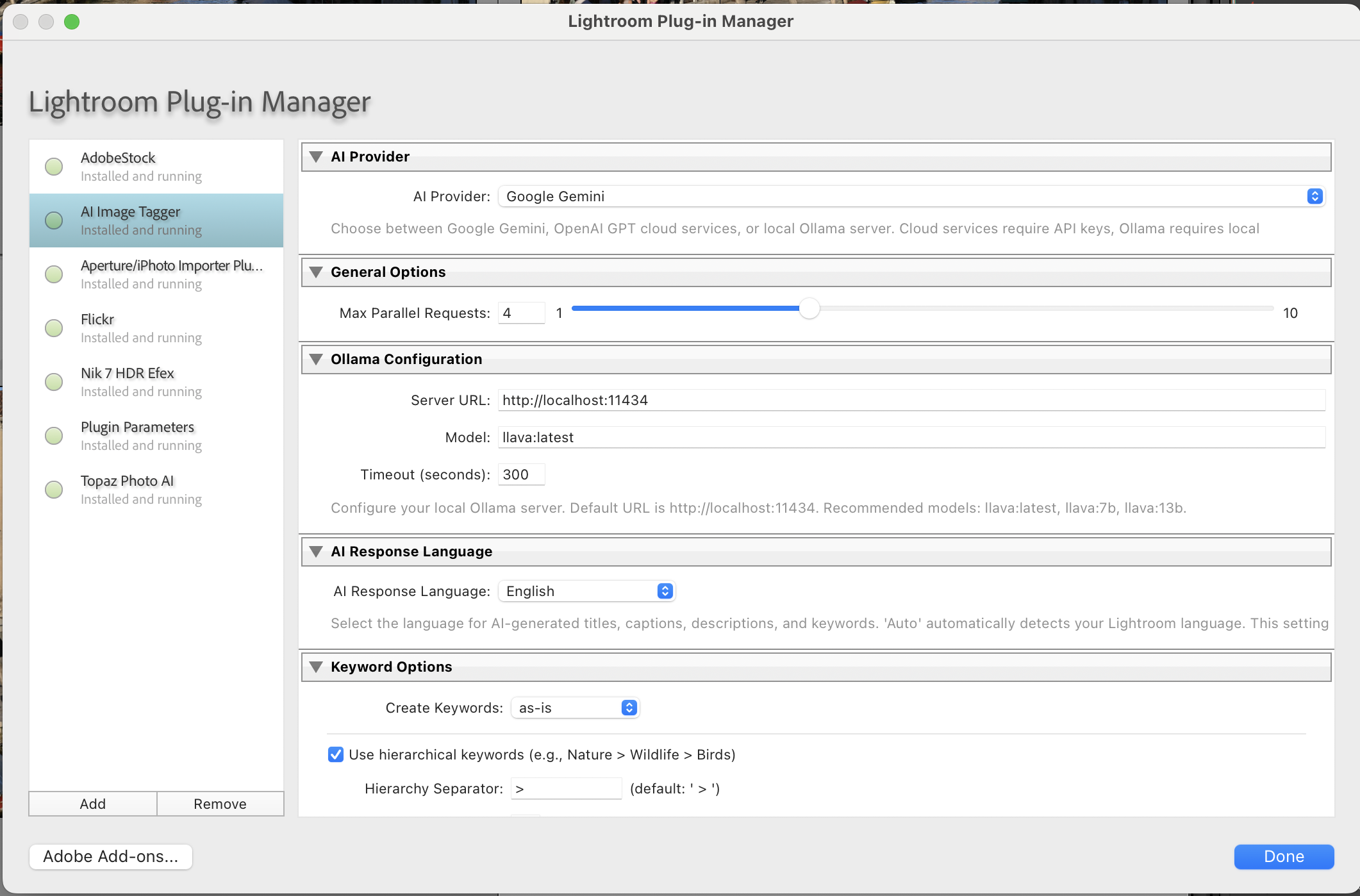
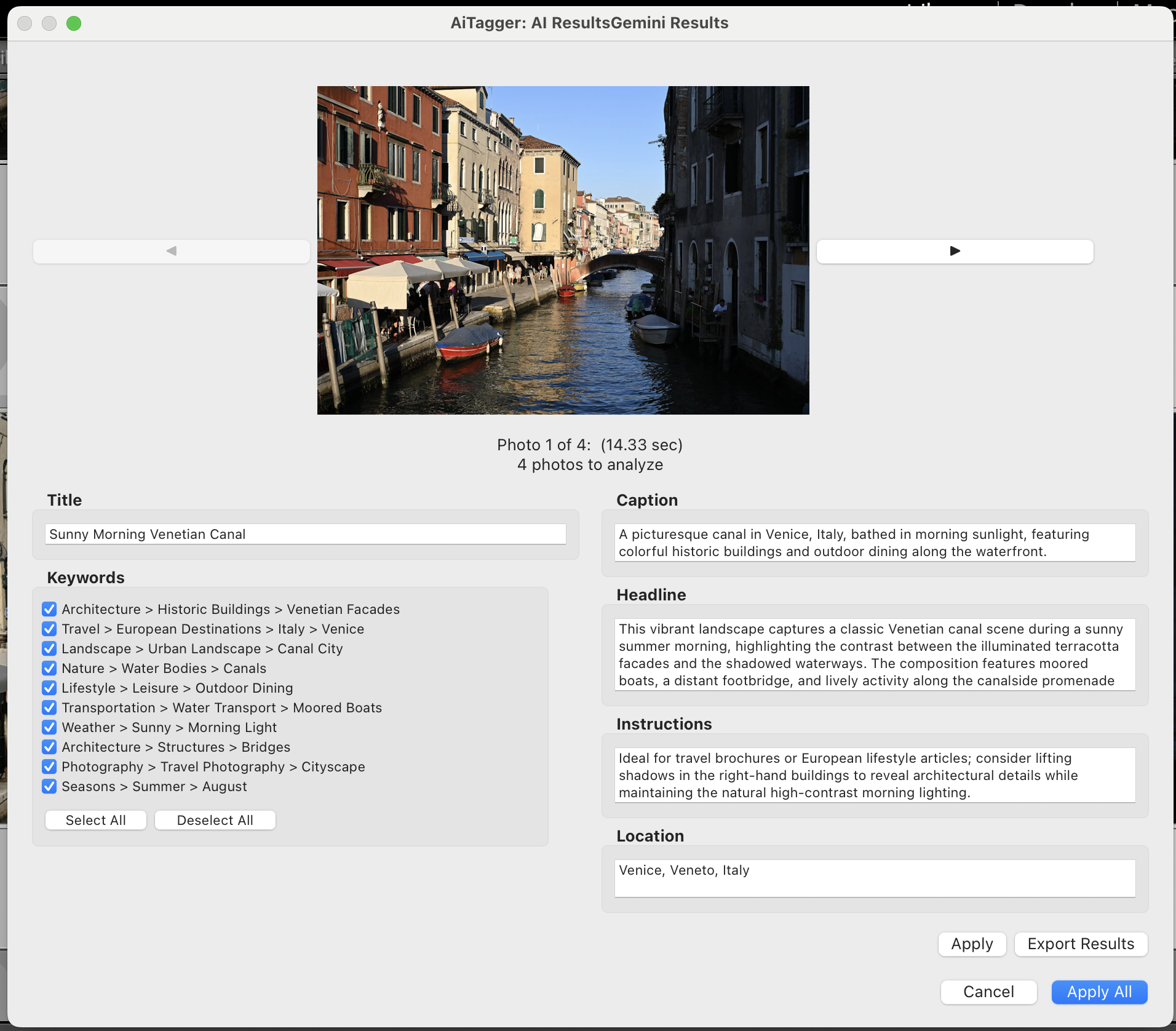
Released September 20, 2026 - Support for the latest OpenAI and Gemini models, plus tunable thumbnail collection for large catalogs.
- Tunable thumbnail collection: General Options now has Thumbnail Batch Size (1-50 photos) and Thumbnail Wait (2-120 seconds). On large runs, a few slow photos used to hold up an entire batch for the full 30-second timeout - lower the wait and the run moves on much sooner.
- GPT-6 and later fixed: The check for models that only accept the default temperature was limited to the gpt-5 family, so GPT-6 failed with "Unsupported value: 'temperature'". It now covers every newer model, and a request rejected over temperature is retried automatically without it.
- OpenAI -pro and -codex models: These aren't served by the chat endpoint and returned a bare HTTP 404. They're now hidden from the model picker, with a clear explanation if one is still selected.
- Deprecated models hidden: OpenAI models whose shutdown date has passed are filtered out of the model list.
- Gemini models updated: Gemini 2.5 and earlier are retired by Google and fail with "no longer available to new users". The recommended models are now Gemini Flash Latest, Gemini Pro Latest, and Gemini Flash-Lite Latest. Existing settings migrate automatically, and a retired model switches to its replacement and retries instead of failing the photo.
Released August 2, 2026 - Newer OpenAI reasoning models now work.
- gpt-5 and o-series models fixed: Requests used the legacy
max_tokens parameter, which the gpt-5 family and o-series models (e.g. o4-mini) reject with an "unsupported parameter" error. Requests now use max_completion_tokens, skip the unsupported custom temperature for reasoning models, and allow a larger token budget so responses aren't cut off.
- Clearer error messages: When a login succeeds but the provider rejects the request (e.g. an unsupported model), the plugin now reports a provider error and suggests trying another model, instead of misleadingly blaming configuration or the network.
Released July 26, 2026 - Edit AI keywords and add your own, right in the plugin.
- Editable keywords: Keywords in the results dialog are now editable text fields instead of read-only checkboxes — fix a misspelling, refine wording, or turn a flat keyword into a hierarchy (
Animal > Dog) before applying.
- Add Keyword button: Add keywords the AI missed — click Add Keyword and type into the new field.
- Remove keywords: Clear a keyword's text to delete it, or simply uncheck it to exclude it without deleting. Edits, additions, and removals are all carried into Lightroom when you Apply.
Released July 26, 2026 - Detected and manually entered locations now save to Lightroom.
- Location now written to metadata: Detected or manually entered locations were being silently dropped because "Save location to IPTC metadata" defaulted to off. It now defaults on, and a one-time migration enables it for existing installs (a later manual toggle is preserved).
- Correct location field: The location is now written only to the IPTC Location (Sublocation) field shown in Lightroom's Location metadata set, instead of also being written into City where it didn't belong.
Note: Lightroom writes metadata to the catalog immediately; XMP sidecar files only update when you save metadata to file (⌘S / "Save Metadata to File", or the catalog's auto-write-XMP setting) — this applies to all fields.
Released July 26, 2026 - Live model discovery for OpenAI and Gemini, plus model switching when reprocessing.
- Dynamic model lists for OpenAI & Gemini: The Model dropdowns in Plug-in Manager settings are now populated live from each provider's API for your key, so new models become selectable without waiting for a plugin update — just like the existing Ollama behavior. A Refresh button re-queries the provider, and an Enter model name manually option lets you type any model ID the list doesn't show.
- Smart filtering: OpenAI's list is filtered to chat/vision-capable models (audio, embedding, image and moderation models are hidden); Gemini's list is filtered to models that support content generation. Well-known models keep friendly names; new ones show their raw API ID.
- Model switching on reprocess: The results dialog's "Active Model" picker now works for OpenAI and Gemini too (previously Ollama-only), so you can re-run a single photo against a different model to compare accuracy without changing your saved default.
- Safer Gemini default: The default model now points at the stable
gemini-2.5-flash instead of a name that could resolve to a retired preview model and fail at analysis time. Newer/preview models still appear via Refresh.
Released July 8, 2026 - Small UI polish fix for the Reprocess button.
- Reprocess button text no longer clipped: The button was sized for "Reprocess" and clipped the longer "Reprocessing..." label it relabels itself to while running. The button now has a fixed width sized for the longer label.
Released July 6, 2026 - Progress indication, collision prevention, and error-handling fixes for the new Reprocess button.
- Progress indication: An inline status row now shows "Reprocessing..." (and the button relabels itself) while a reprocess is running.
- No more collisions: All fields, the Prev/Next photo buttons, the Active Model dropdown, and the Reprocess/Apply/Export buttons are disabled while a reprocess is in flight, so repeated clicks can't queue or collide.
- Clearer timeout/failure handling: If a model times out or returns no usable content, the dialog now shows an inline explanation instead of leaving every field blank.
- Error dialog no longer hides behind the results dialog: Reprocess failures are now shown inline instead of in a second modal dialog that could render behind the results dialog and appear to freeze it.
Released July 5, 2026 - Root-cause fix for the Export Results CSV failure introduced in earlier versions.
- Export Results fixed for real: The 8.4.5 fix caught the per-row error but didn't address its cause, so exports still silently produced only a header row. The actual cause was a Lua/Lightroom SDK restriction:
photo:getFormattedMetadata() yields internally and can't be called inside a pcall. Filenames are now looked up before entering any pcall, so Export Results now actually writes data rows.
Released July 5, 2026 - Reprocess a photo directly from the results dialog, plus an Export Results fix.
- Reprocess button: Re-run AI analysis on the currently displayed photo directly from the results dialog. For Ollama, an "Active Model" dropdown lets you override the model for just that reprocess run.
- Export Results fixed: Exporting results no longer aborts after writing only the CSV header when a field contains an unexpected value type; rows are now written independently so one bad row doesn't break the whole export.
- Ollama Plugin Manager polish: Removed a remaining flash where "Enter model name manually" briefly ticked itself on dialog open, and the Custom Model field is now reliably disabled and cleared when unticked.
Released July 4, 2026 - Fixes for Ollama model selection and a Title field display glitch.
- Ollama model switching fixed: Switching back to the first model in the list after using a different one no longer incorrectly enables "Enter model name manually" with the model name auto-populated into the Custom Model field. The saved model is now matched against the actual list of models fetched from the Ollama server.
- Title field visibility fixed: Worked around a Lightroom UI rendering bug where the Title field didn't display its text after AI analysis on a single photo until the user moused over it.
Released June 14, 2026 - New Gemini 3.x and GPT-4.1 models added; deprecated models removed.
- New Gemini models: Gemini 3.5 Flash (new stable flagship, now default), Gemini 3.1 Flash Lite (lightweight), Gemini 2.5 Flash Lite (budget). Gemini 2.0 Flash removed — shut down by Google.
- New OpenAI models: GPT-4.1 (now default), GPT-4.1 Mini, GPT-4.1 Nano — all support vision with a 1M token context window. GPT-4 Turbo and GPT-4 Vision Preview removed as deprecated.
- Auto-migration: Users on the discontinued Gemini 2.0 Flash are automatically moved to Gemini 3.5 Flash on next launch.
Released June 14, 2026 - Correctly fixes the blank Plugin Settings screen from v8.4.0.
- Plugin Settings blank screen fixed: v8.4.1 used
require "AICommon" which discards the return value, leaving AICommon nil. Changed to local AICommon = require "AICommon" matching the pattern used by all other modules. My Prompts feature now works correctly.
Released June 14, 2026 - Fixes a crash introduced in v8.4.0 that caused Plugin Settings to show a blank screen.
- Plugin Settings blank screen fixed: AIProviderFactory was calling AICommon functions without requiring the module, causing a nil-index error on every attempt to open Plugin Settings. The My Prompts feature now works correctly.
Released June 14, 2026 - Store and reuse your own custom prompts without copy-pasting.
- My Prompts dropdown: A new "My Prompts" dropdown appears in Plugin Settings under AI Prompt Customization. It lists all
.txt files from the prompts/ folder inside the plugin directory. Select one to instantly load it into the Custom Prompt text area.
- Open Folder button: Click "Open Folder..." to create the
prompts/ folder if it doesn't exist and open it in Finder (macOS) or Explorer (Windows). Drop your .txt prompt files there.
- No restart required: Just reopen Plugin Settings after adding files and they appear in the list immediately.
Released June 14, 2026 - Removed the non-functional Batch Size field and improved Delay Between Requests help text.
- Batch Size removed: The "Batch Size (1–10 photos per batch)" field was dead code — it was stored in preferences but never read by the processing loop. Removed to avoid confusion. The two settings that actually control throughput are Max Parallel Requests and Delay Between Requests.
- Better help text: Delay Between Requests now explains its purpose and gives a concrete recommendation for Gemini free tier: 2000ms delay + Max Parallel Requests = 2 for reliable processing of any number of photos.
Released June 14, 2026 - Full Danish UI translation and Danish AI response language option.
- Danish UI: All menus, dialogs, settings panels, and status messages are now available in Danish (da).
- Danish AI responses: Danish added to the AI Response Language dropdown so AI-generated titles, captions, keywords, and descriptions can be returned in Danish.
Released May 8, 2026 - Results dialog now properly resizes horizontally and vertically, and opens wider by default.
- Dialog resizing: Both metadata columns now fill and resize correctly when you drag the dialog wider — no more clipped right column.
- Keyword panel: The keyword list scrolled area now fills the available vertical space in the left column.
- Wider default: The dialog opens at ~900px wide by default so both columns are fully visible without resizing.
- Larger text fields: Caption, Headline, Instructions, Copyright, and Location fields are taller for easier reading and editing.
Released May 8, 2026 - Fixes a crash when keyword decoration is set to Parent Keyword with a blank value.
- Keyword Decoration Crash: When "Parent Keyword" decoration was enabled but the value field was empty, Lightroom would throw an "Internal Error: Name must be a non empty string" dialog. The parent/prefix/suffix value is now validated and trimmed before use, and keyword creation falls back gracefully when the parent value is blank.
Released May 7, 2026 - Results panel now resizes with the dialog; Ollama returns keywords in the correct language.
- Results Panel Scaling: The metadata panel now properly grows and shrinks with the dialog window — fixed height/width constraints removed.
- Ollama Keyword Language: A system-role message is now injected when a non-English response language is configured, so weaker Ollama models reliably return keywords and all fields in the requested language.
Released May 7, 2026 - Fixes metadata panel being too small in v8.3.1.
- Metadata Panel Height: The metadata panel was collapsing to minimum size in v8.3.1. Restored a fixed height (550px) — taller than the original — so all fields are visible without excessive scrolling.
Released April 29, 2026 - Metadata panel now fills the window when resized; German translation updated.
- Results Window Resize Fix: The metadata panel now properly fills the dialog when you drag it taller — no more fixed inner scrollbox.
- German Translation: Updated community-contributed German translation including the new AiTagger marker option.
Released April 28, 2026 - Filter processed photos in Library; larger results dialog.
- AiTagger Marker: New option in Plugin Manager: "Add AiTagger marker to Instructions field". When enabled, writes
AiTagger: <provider> <model> (e.g., AiTagger: gemini gemini-2.5-flash) to the IPTC Instructions field for every processed photo. Use Lightroom's Library Text Filter on Instructions to find or exclude already-processed photos, or to identify which AI model was used.
- Larger Results Window: The results dialog is now taller by default (700px vs 450px), reducing the need to scroll to see all metadata fields.
Released April 5, 2026 - Fixed "llava:latest not found" error on fresh installs.
- Ollama Default Model Bug: Removed the hard-coded
llava:latest default. Users with fresh installs or who had never opened Plugin Manager were getting "Model 'llava:latest' not found" even after selecting a different model (e.g., gemma3:4b). The plugin now handles an unconfigured model gracefully and shows a clear message directing you to Plugin Manager to select one.
Released April 5, 2026 - Ollama now queries your server for installed models instead of showing a fixed list.
- Dynamic Ollama Model List: The plugin automatically queries your locally running Ollama server at startup to populate the model dropdown with your actually installed models.
- Refresh Button: Re-query the server at any time after running
ollama pull <model> to pick up newly installed models.
- Manual Model Entry: A new "Enter model name manually" checkbox reveals a text field for typing any model name (e.g.,
gemma4:e4b) — useful for newly released or custom models. Previously saved custom models are automatically detected and pre-filled.
Released March 2, 2026 - Corrected Gemini 3.1 Pro model identifier
- Gemini 3.1 Pro Model: Corrected model name and ID from
gemini-3-pro-preview to gemini-3.1-pro-preview to match Google's actual model identifier.
Released February 24, 2026 - Fix for GPS location data being ignored by AI
- GPS Location Accuracy: When GPS coordinates or IPTC location metadata are included in AI analysis, the AI now uses them as the authoritative location source instead of guessing from visual content alone. This fixes cases where the AI identified a visually similar but geographically incorrect location.
Released February 15, 2026 - Bug fix with model selection in Ollama
- Fixed a bug with model selection in Ollama.
Released February 14, 2026 - Fixed Ollama thinking models, 25-photo batch limit, and added configurable thumbnail resolution.
- Ollama Thinking Models Fixed: qwen3-vl, llama3.2-vision, and other thinking models now return proper results instead of empty responses. Token budget increased from 1000 to 4096 with automatic <think> tag stripping.
- 25-Photo Limit Fixed: Selecting more than 25 photos now processes all of them. Thumbnail requests are batched to avoid overwhelming Lightroom's async system.
- Configurable Thumbnail Resolution: New slider in Plugin Manager (400-2400px) to control the resolution of thumbnails sent to AI for analysis. Higher = more detail, lower = faster processing.
- Fuji RAW Support: Added .RAF file detection for proper thumbnail sizing.
- Enhanced Diagnostics: Better logging for Ollama response debugging, including thinking field detection and token exhaustion warnings.
Released February 12, 2026 - 11 bug fixes, keyword limits raised to 75, scrollable results dialog, and shared AI parsing module.
- Keyword Truncation Fix: Fixed critical bug where only 25-27 of 50+ AI-generated keywords were written to IPTC metadata.
- Keyword Limits Raised: Maximum AI keywords and display slots increased from 25/30 to 75/75, supporting professional workflows.
- Scrollable Results: AI results panel now scrolls, keeping action buttons visible even with 50+ keywords.
- Batch Processing Crash Fix: Fixed gmatch crash when OpenAI returns keywords as arrays instead of strings.
- 11 Bug Fixes: Fixed sparse array issues, nil crashes in Ollama/Gemini/OpenAI, CSV export file leak, photo navigator crash, and more.
- Shared AI Module: New AICommon.lua consolidates response parsing across all three providers, eliminating ~300 lines of duplicate code.
Released February 12, 2026 - Fixed empty fields when using newer Ollama vision models.
- Structured Content Parsing: Fixed empty results when Ollama models return structured content arrays instead of plain text strings.
- Broader Model Support: Improved compatibility with Qwen3-VL, Llama 3.2 Vision, Gemma 3, and other newer vision models.
Released February 12, 2026 - Fixed Ollama compatibility with newer vision models and UI text truncation.
- Ollama Chat API: Switched to /api/chat endpoint for full compatibility with Qwen3-VL, Gemma 3, and Llama 3.2 Vision models.
- UI Text Fix: Help text now wraps properly in the Plugin Manager window instead of being truncated.
Released February 11, 2026 - Updated Ollama vision models and fixed model detection bug.
- Updated Vision Models: Replaced outdated model list with Qwen3-VL (recommended), Gemma 3, Llama 3.2 Vision, and Qwen 2.5-VL.
- Model Detection Fix: Fixed bug where models with hyphens in their names (e.g., llava-llama3) failed connection tests due to Lua pattern matching issue.
Released February 11, 2026 - Added Czech language support and fixed OpenAI keywords crash.
- Czech Language Support: Added Czech (Čeština) as a new AI response language with full UI translation.
- OpenAI Keywords Crash Fix: Fixed crash when OpenAI returns keywords as a JSON array instead of a comma-separated string.
- Robust Response Parsing: All AI response fields now safely handle unexpected types across OpenAI and Gemini providers.
Released February 11, 2026 - Fixed remaining freeze caused by missing thumbnail counter decrement.
- Thumbnail Pending Counter Fix: Fixed missing counter decrement when 200x200 fallback thumbnail succeeded, which caused the plugin to hang indefinitely.
- Safety Timeout: Added 60-second timeout to thumbnail collection phase to prevent infinite hangs.
- Diagnostic Logging: Added periodic warning logs during thumbnail wait showing how many thumbnails are still pending.
Released February 10, 2026 - Fixed critical freezing issue caused by oversized thumbnails.
- Freezing Fix: Resolved critical freezing issue that occurred before sending data to AI providers.
- Thumbnail Size Limits: Added 1 MB size limit check to prevent memory issues with large thumbnails (8+ MB).
- Progressive Size Reduction: Automatically regenerates oversized thumbnails at smaller dimensions (400×400 → 200×200 → 100×100).
- Universal Retry Logic: Size reduction now applies to ALL file types, including PSD and heavily edited RAW files.
- Improved Performance: Smoother processing with no UI freezes during thumbnail generation.
Released January 28, 2026 - Added user configuration for AI-generated keyword count and UI display limits.
- AI Keyword Count: Configure how many keywords the AI should generate (5-25, default: 12).
- UI Display Limit: Set the number of keyword checkboxes in results dialog (5-30, default: 10).
- Dynamic Prompts: AI prompts now automatically use your configured keyword count preference.
- Plugin Manager Settings: Both settings are easily configurable in the Keyword Options section.
Released January 6, 2026 - Major improvements to Ollama integration with robust JSON parsing and UI fixes.
- Ollama Keyword Parsing: Fixed critical issue where Ollama returned malformed JSON causing keywords and other fields to be empty.
- Multiple Keyword Formats: Now handles all Ollama keyword formats - arrays, comma-separated strings, and object/hash formats.
- Robust JSON Cleanup: Automatically fixes trailing commas and malformed object structures in Ollama responses.
- View Prompt Examples: Fixed button to properly open GitHub documentation in browser.
- Cleaner Logging: Reduced verbose debug logs for better performance and readability.
Released January 5, 2026 - Enhanced AI analysis with existing keyword context for better, more personalized results.
- Keyword Context: AI now receives existing keywords (people names, job identifiers, events) as context for analysis.
- Better Captions: AI-generated captions and descriptions now reference existing keywords for more relevant, personalized results.
- Complementary Keywords: AI suggests additional keywords that complement existing tags.
- Preserved Keywords: Existing keywords are always preserved when new keywords are added.
Released January 5, 2026 - Fixed broken documentation URL in plugin info.
- Documentation URL: Updated plugin info URL to point to correct documentation location.
Released November 25, 2025 - Fixed
critical bugs related to keyword processing and hierarchy handling.
- Keyword Fixes: Resolved issues with keyword formatting and hierarchy
processing.
Released November 23, 2025 - Added
support for Gemini 3 and fixed issues with keyword prefixes and hierarchical keyword handling.
- Gemini 3 Support: Added support for the latest Google Gemini 3 models
- Keyword Cleanup: Fixed issue where "AI:" prefix appeared in keywords
- Duplicate Removal: Improved deduplication of keywords when hierarchical
keywords are disabled
- Hierarchy Control: Fixed issue where hierarchical keywords were returned
even when disabled
Released November 10, 2025 - Fixed
critical "exits too quickly" issue with proper retry logic and exponential backoff.
- Automatic Retry Logic: Fixed issue where quota/rate limit errors caused
immediate failures
- Exponential Backoff: Proper retry mechanism with 2s, 4s, 8s delays for
temporary issues
- Network Resilience: Network errors now properly retry instead of failing
immediately
Enhanced keyword format validation and
hierarchical keyword improvements.
- Keyword Format Validation: Explicit instructions ensure keywords are
comma-separated strings
- Hierarchical Keywords: Better prompt engineering for hierarchical keyword
generation